![ndustrial-logo-color-1-1.png]](https://info.ndustrial.io/hs-fs/hubfs/ndustrial-logo-color-1-1.png?height=40&name=ndustrial-logo-color-1-1.png)
Always follow any device-specific, asset-specific, or job-specific instructions presented in the Ndustrial provisioning app.
Table Contents:
Temperature Sensor Placement
Reach-In Refrigerators and Freezers
Preferred Location
- Mount the sensor against the back wall, near the middle of the reach-in. Keep it away from fans and areas directly affected by concentrated airflow, which may produce readings that don’t represent typical product-storage conditions.
- Avoid locations where shelving, stored product, or normal stocking activity may obstruct or damage the sensor.
Connected Multi-Section Reach-Ins
- When multiple sections are connected without physical partitions, treat them as one continuous unit, since air can move between sections.
- Determine sensor quantity based on the total number of doors across the connected sections, and place each sensor near the middle of the area it’s intended to monitor.
Separate Self-Contained Reach-Ins
- When adjacent units are separated by a physical partition, treat each unit as a separate refrigerated asset.
- Install a sensor near the middle of each unit, against the back wall.
Sensor Quantity Guidance
- Install one sensor for every five doors (approximately 12–13 ft of case length) when sections share continuous airflow.
- When a physical partition separates adjacent units, install at least one sensor in each separate unit.
Special Conditions
Before installation, confirm whether airflow is continuous between sections or blocked by a physical partition.
Avoid placing sensors:
- Directly in fan discharge or concentrated airflow
- Where stored product will routinely block the device
- Where shelves or stocking activity may damage or obstruct it
Walk-In Refrigerators and Freezers
Preferred Location
Walk-in coolers:
- Mount the sensor on the back wall, approximately 8 in below the ceiling.
- Place it approximately 4 in to the left or right of the evaporator furthest from the entrance door, on the side without copper or insulated piping coming out of the evaporator.
Walk-in freezers:
- Mount the sensor on the back wall, approximately 8 in below the ceiling (same height as coolers).
- Multiple evaporators: Center the sensor between them.
- One evaporator: Center the sensor on the back wall, away from the evaporator’s airflow.
Special Conditions
- Choose a location where shelving, stored product, and normal stocking activity won’t block or damage the sensor.
- Do not place the sensor directly in evaporator discharge airflow (in front of the fans) or in another location that may not represent typical conditions within the space.
Door Sensor Placement
Door sensors are installed only on walk-in refrigerated assets.
Preferred Location
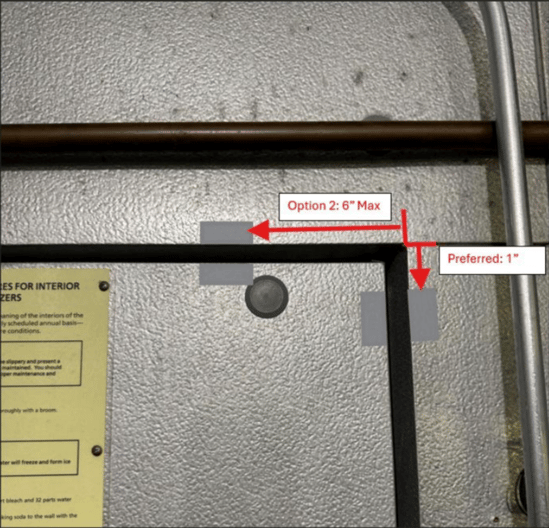
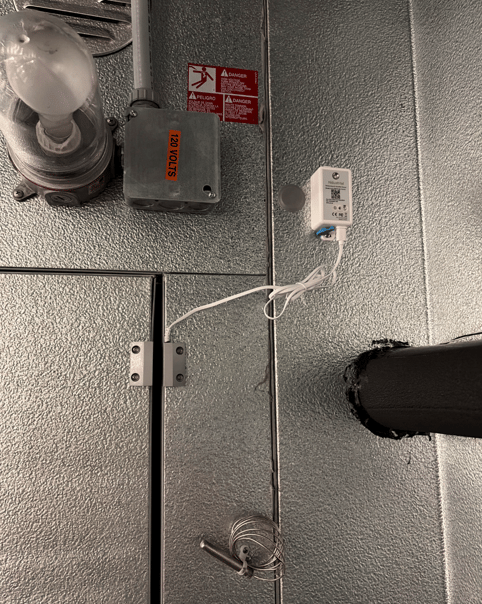
Install the door sensor inside the walk-in, at the upper corner of the door on the side opposite the hinges.
- Preferred: Mount the contacts on the side of the door, approximately 1 in below the top corner.
- Option 2: If the side gap is too wide for reliable open-and-closed detection, mount the contacts on the top of the door, no more than 6 in from the corner.
- Sensor body: Mount it approximately 1 ft diagonally from the contacts, away from the door opening, to keep it out of the airflow when the door opens and closes.
Choose a location that:
- Is clear of normal foot traffic
- Won’t interfere with door operation
- Keeps the sensor and wiring protected from routine activity
- Allows the sensor and contact to align correctly when the door is closed
Door-to-Frame Gap
- Use the provided spacing template to confirm the door-to-frame gap is within the supported range.
Special Conditions
If neither location provides the required spacing:
- Capture clear photos of the proposed mounting area and door-to-frame gap
- Document the condition in the provisioning app
- Contact Ndustrial before completing the installation
Do not install the door sensor in a location where it can’t reliably detect both open and closed door states.